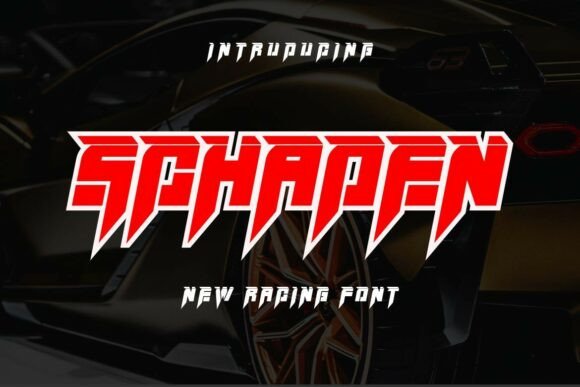
Schaden: The High-Octane Racing Font for Bold Designers
When it comes to typography, the right font can make all the difference. Schaden is a racing-inspired typeface that brings speed, power, and attitude to any design project. Created with adrenaline-fueled visuals in mind, this font is ideal for automotive branding, esports logos, extreme sports graphics, and high-energy marketing materials. But before you jump into using Schaden, there are several important considerations that can help ensure your project looks its best and performs effectively.
What Makes Schaden Unique?
Schaden stands out due to its heavy, forward-leaning slant and sharp, jagged terminals that echo the aggressive lines of a supercar. The 3D block effect adds depth and intensity, making it a standout choice for projects where visual impact is key. Unlike more traditional fonts, Schaden doesn’t just convey text—it evokes motion and emotion. This makes it especially powerful for designers aiming to create a bold first impression or communicate a sense of urgency and excitement.
Common Mistakes When Choosing Schaden
While Schaden is a powerful tool, many users make missteps when selecting it for their projects. One common mistake is assuming it’s suitable for every use case. Because of its strong, angular style, it may not work well in environments where readability is paramount—such as body text in a long-form article or product descriptions on an e-commerce site. Always consider the context before applying this font globally across your design.
Overlooking Readability in Smaller Sizes
Another oversight is using Schaden at smaller sizes without testing how legible it remains. The font's design prioritizes visual punch over subtle clarity, so if used in small print (e.g., captions or footnotes), it could become difficult to read. Test it at various sizes to ensure it still communicates your message effectively without sacrificing comprehension.
Misunderstandings About Font Licensing
A lot of creators forget to check the licensing terms when downloading or purchasing Schaden. While some free versions might allow personal use, commercial applications often require a paid license. Ignoring these details can lead to legal issues down the line, especially if the font is used in marketing materials, merchandise, or digital products intended for sale. Always verify the usage rights before finalizing your design and sharing it publicly.
Design Misalignment: Using Schaden Without Context
Schaden thrives in high-contrast settings. Pairing it with muted colors or placing it on busy backgrounds can reduce its effectiveness. For example, using it on a poster with a cluttered image might cause the text to get lost. Instead, place Schaden against solid or gradient backdrops that highlight its form and movement. Think of it like a car on a racetrack: the environment should enhance, not distract from, the main attraction.
Better Approach: Complement with Simpler Fonts
To maintain balance in your design, pair Schaden with simpler, sans-serif or monospace fonts for secondary text. This helps guide the reader through the content while preserving the energy of the headline. A great example is using Schaden for a brand name and switching to Helvetica or Arial for supporting information. This contrast ensures both aesthetics and usability are maintained.
Ignoring Accessibility Considerations
Highly stylized fonts like Schaden can sometimes pose accessibility challenges. Users with dyslexia or visual impairments may struggle to read complex letterforms. Before finalizing your design, test it using screen readers and contrast checkers to ensure it meets web accessibility standards. If necessary, offer alternative text options for those who need them.
Practical Tip: Use as Accent, Not Main Text
To avoid alienating parts of your audience, reserve Schaden for accents, headlines, or call-to-action buttons. This way, you're leveraging its strengths without compromising the overall user experience. Imagine using it for a “Win Now” button on a gaming site—its boldness draws attention, but it doesn't interfere with the readability of the rest of the page.
Performance Pitfalls in Web Projects
Using Schaden in web design can be tempting, but performance must be considered. Large, custom fonts can increase load times, especially if they’re embedded in multiple weights or styles. To mitigate this, only include the specific variants you’ll actually use. Tools like Google Fonts or Adobe Fonts provide optimized delivery methods, but even then, keep an eye on file size and loading behavior.
Optimize for Speed
Use font-display settings such as “swap” or “fallback” to ensure your site remains usable during font loading. Additionally, consider lazy-loading the font or using it sparingly on landing pages where performance matters most. A fast-loading website improves user satisfaction and search rankings alike.
Poor Color Choices Can Diminish Impact
Schaden's bold design is meant to pop—but only if the color contrasts properly. Many designers fall into the trap of using light gray or pastel tones with this font, which can mute its intensity. Instead, stick to high-contrast combinations like black on white, red on yellow, or white on dark blue. These pairings will amplify the font’s dynamic feel and make it stand out in any visual hierarchy.
Realistic Example: Esports Logo Design
Let’s say you’re designing a logo for an esports team. You pick Schaden for the team name because it feels aggressive and modern. However, if you choose a pale pink on a beige background, the result may look weak and unprofessional. Switching to a deep crimson on a matte black base would instantly sharpen the look and align better with the competitive edge the font was designed to represent.
Choosing the Wrong Weight or Style
Schaden often comes in multiple weights and variations, but not all are created equal. Some versions may be too thin for print or too thick for digital screens. It's easy to assume that one weight works everywhere, but doing so can hurt your project’s professionalism. Always review each variant and test it in the intended medium—whether it's a billboard, a mobile ad, or a social media post.
How to Choose the Right Variant
- Print Media: Opt for bolder weights to ensure visibility from a distance.
- Digital Screens: Choose mid-range weights to avoid pixelation and maintain clarity.
- Backgrounds: Match the font weight to the brightness and complexity of the backdrop.
Not Checking Cross-Platform Compatibility
Designing with Schaden is exciting, but compatibility issues can arise when moving between operating systems or devices. Sometimes, a font looks perfect on your Mac but appears distorted on Windows. This is usually due to differences in rendering engines. Always preview your design on multiple platforms and browsers to catch any inconsistencies early.
Testing Across Platforms
Tools like BrowserStack or cross-platform prototyping software can help you simulate how Schaden will render on different devices. If you notice odd spacing or scaling, adjust the font-size or leading accordingly. Small tweaks can make a big difference in ensuring a consistent experience for all users.
Overlooking Cultural and Industry Appropriateness
Fonts carry connotations beyond their visual appeal. While Schaden is perfect for action-packed themes, it may not fit in more conservative industries like finance or healthcare. Similarly, using it in educational materials or formal presentations could send the wrong message. Always match the font to the tone and expectations of your target audience.
When to Avoid Schaden
- Corporate reports or legal documents
- Academic publications or instructional manuals
- Traditional wedding invitations or formal event signage
Best Practices for Effective Use
To get the most out of Schaden, start by defining its role in your project. Is it for a title? A slogan? A tagline? Once you know the purpose, you can fine-tune everything else around it—from layout to color to supporting fonts. Here are a few tips to follow:
- Test in Real Environments: Apply Schaden to mockups that reflect actual usage scenarios.
- Limit Usage: Don’t overuse it. Let it shine in key areas without overwhelming the rest of the design.
- Pair Thoughtfully: Choose complementary fonts that don’t clash but support the overall theme.
- Respect Legibility: Ensure the font is readable in its primary application, whether on screen or in print.
Where to Find and Evaluate Schaden
If you’re considering Schaden for your next project, it’s essential to evaluate it thoroughly before purchase. Visit reputable font marketplaces like Adobe Fonts, MyFonts, or FontShop to explore available weights and see live previews. Look for reviews from other designers to understand real-world performance and reliability.
Before You Buy:
- Confirm the license covers your intended use (personal vs. commercial).
- Check for any hidden costs or limitations in the package.
- Look for a trial version or demo to test the font before committing.
Conclusion: Power Through Purposeful Typography
Schaden is a high-octane font with a unique identity that can elevate the right design from good to unforgettable. However, like any powerful tool, it requires careful handling. By understanding its strengths and limitations, checking compatibility, respecting accessibility, and using it thoughtfully, you can harness its potential without falling into common traps. Whether you're building a brand, creating a poster, or launching a campaign, Schaden can be the spark you need—if used correctly.